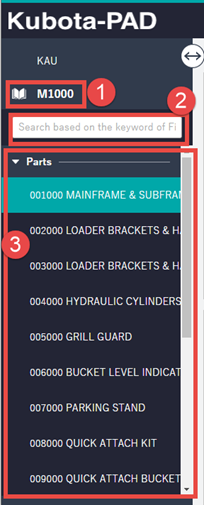
Once you open a Book you will see the below view:
Navigation Bar:
- Indicates the book you are currently viewing
- Enables you search keywords to within the book to display
- Lists each page that relates to your book.
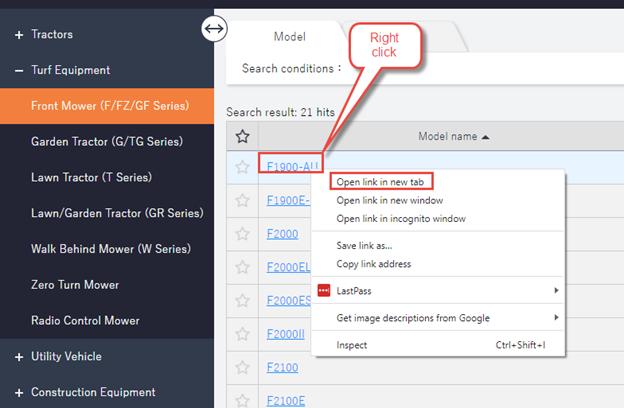
NOTE: If you wish to open multiple windows/books at the same time “Right click” on the book name and “Open link in new tab”
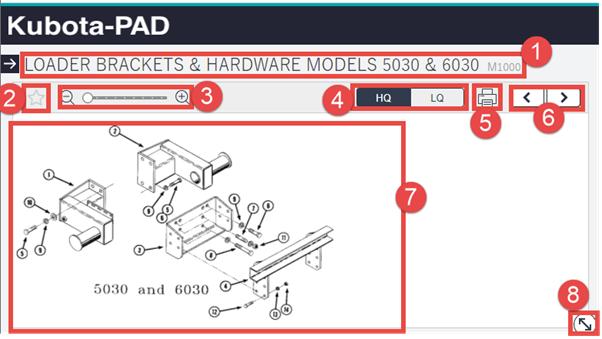
Drawing view:
- Screen title indicating the part and model of the current screen:
- Add to bookmarks. Add the current page to your bookmark list.
- Zoom in and out. Allows you to zoom in and out of the drawing.
- HQ and LQ – indicates the drawing quality (For users with slower internet you may wish to use LQ)
- Allows you to print the current screen.
- Next and previous page. Allows you to move between pages.
- Drawing screen. This shows you the part and labels each of items in the parts table.
- Drawing screen resize. Allows you to make the Drawing screen bigger or smaller on your screen.
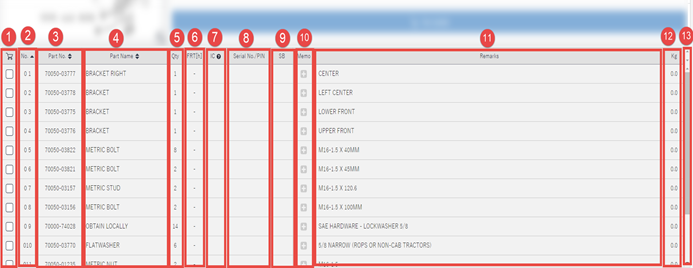
Parts table:
- Add to shopping basket: Adds Selected parts your shopping Basket
- No: Indicates the part item indicated by the number on the drawing.
- Part No: Indicates the Kubota part number for ordering.
- Part Name: Indicates the part name.
- Qty: Indicates the number of parts needed for line item
- FRT: Not in use.
- IC: Part is interchangeable (Click on the “?” for details)
- Serial No. / PIN = Product Identification Number (Serila number Brakes)
- SB: “Service Bulletin”
- Memo: (NOTE Memo is not yet supported)
- Remarks: Kubota comments/ Notes that relate to the line item.
- Kg: shows the expected weight of the line item. (NET weight)
- Scroll Bar: Indicates if there are more lines to be shown.
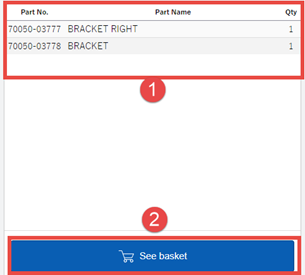
Shopping Parts list:
This view shows the Parts added from the parts table to your shopping list.
- List of Parts that have been added into the shopping basket
- See Basket: Takes you to the checkout page.