There are 2 Search tabs that can be used “Model” and “Parts”
Model Search:
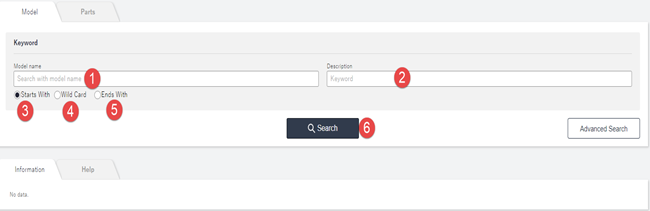
- Allows you to enter the Model name of the asset you are looking for.
- Allows you to enter a keyword or description of the asset you are looking for.
- Click if you know the characters entered in point 1 are in the start of the asset name
- Click if you know the characters entered in point 1 are anywhere within the asset name
- Click if you know the characters entered in point 1 are at the end off the asset name
- Finds and lists any records with the above criteria.